Keeping track of your advising notes, tutoring appointments and campus resources shouldn’t feel like a scavenger hunt.
Starting April 23, Ohio State students can download the Navigate360 Student app — bringing an OnCourse mobile experience straight to your fingertips.
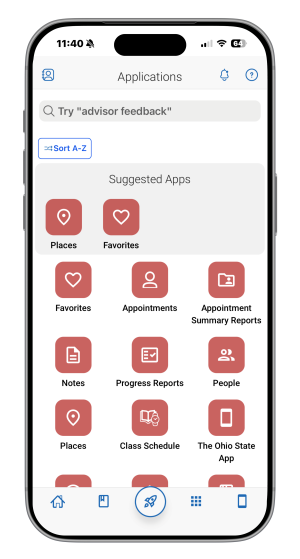
In the app, you can easily access your advising, tutoring, and coaching notes, schedule an appointment or find the link to Canvas. It’s a shortcut to what matters most, whether that’s checking your class schedule while walking through the Oval, finding a campus resource or preparing for an advising appointment.
Students who had early access to the app said it’s faster, easier and less frustrating. No extra clicks, no digging through multiple tabs, just what you need, when you need it.
What you can do in the app:
- View your class schedule
- Schedule appointments with advisors, tutors and support staff
- Access your student success network
- Find campus resources
- Use the Document Center to find important notes and paperwork, like your advising notes
The updated OnCourse/Navigate360 provides an easier way to access tools you already use on your phone, tablet, or computer. For day-to-day check-ins, quick planning and staying organized on the go, OnCourse will meet you where you are, allowing you to personalize your experience by favoriting the tools and notes you use most.
Starting April 23, search “Navigate360 Student” in the App Store or Google Play to download and make your academic life a little easier.
Look for: